
Hey there, Shopify store owners!
It’s time for a little digital spring cleaning! If you’ve been using Google Analytics to keep track of your website traffic and customer behavior, you probably know that Universal Analytics is being phased out. The new kid on the block? Google Analytics 4 (GA4). But don’t sweat it! The transition is smoother than you think, and I’m here to guide you every step of the way.
First, ensure you’ve installed the Google & YouTube app for Shopify. This versatile app not only helps set up GA4 but also assists in establishing Google Ads conversions and managing your Google Merchant Center shopping feed. Pretty neat, huh?
With that in place, let’s get started!
Step-by-Step Guide
Create a GA4 Property
This step is only applicable if you don’t have a GA4 property that you want to link to Shopify yet.
- Fire up your Google Analytics account.
- Click on ‘Admin’ at the bottom left of the page, then select ‘+ Create Property’.
- Fill in your property details and click ‘Next’.
- On the next page, input your business information and click ‘Next’.
- Then complete your business objectives and click ‘Create’.
- Finally, at the data collection screen choose ‘Web’ as the platform.
- Complete the details and click on ‘Create stream’.
Connect GA4 with Shopify
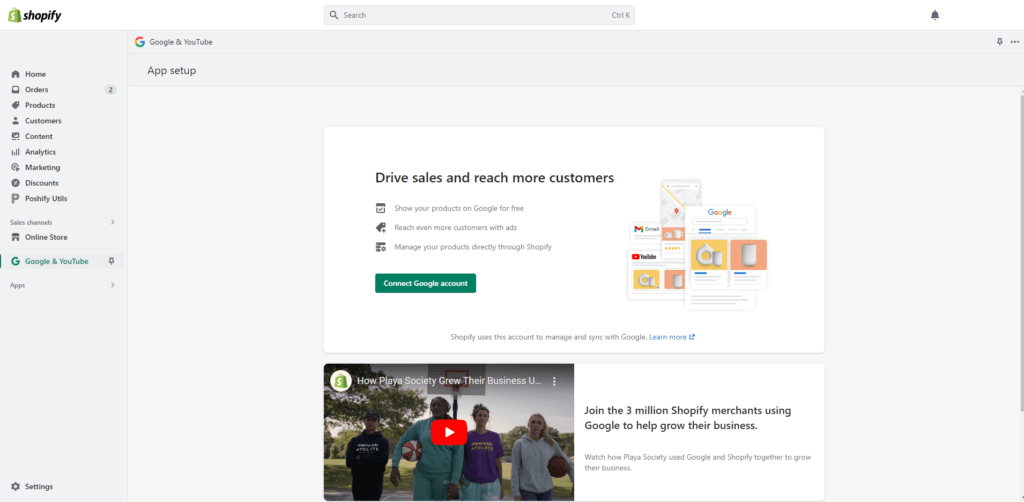
- Log into your account and launch the Google & YouTube app.
- Click on ‘Connect Google account’ and link your Google account that contains the GA4 property that you want to use.
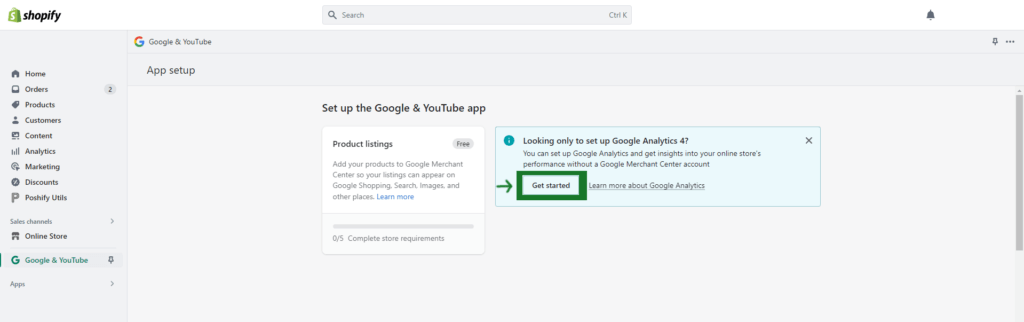
- Scroll until you spot a section called ‘Setup GA4’, and click ‘Get Started’.
- Log in with the Google account that contains the GA4 property.
- From there, you can link the specified GA4 property to Shopify.
Just like that, your Shopify store is now GA4-ready!
Remember, GA4 is more than just a numbers game. It’s about truly understanding your customers, allowing you to provide more of what they love about your store. With the added bonus of setting up Google Ads conversions and managing your Google Merchant Center shopping feed, the Google & YouTube app is your all-in-one solution for making the most of Google’s toolkit.
So go on, embrace Google Analytics 4. You’ve got this!
Leave a Reply